> ## Documentation Index
> Fetch the complete documentation index at: https://yuno-3979e326-docs-agent-readable-descriptions.mintlify.site/llms.txt
> Use this file to discover all available pages before exploring further.
# Seamless SDK
> Yuno's Seamless SDK provides a simple and efficient integration while giving you full control over the payment experience.
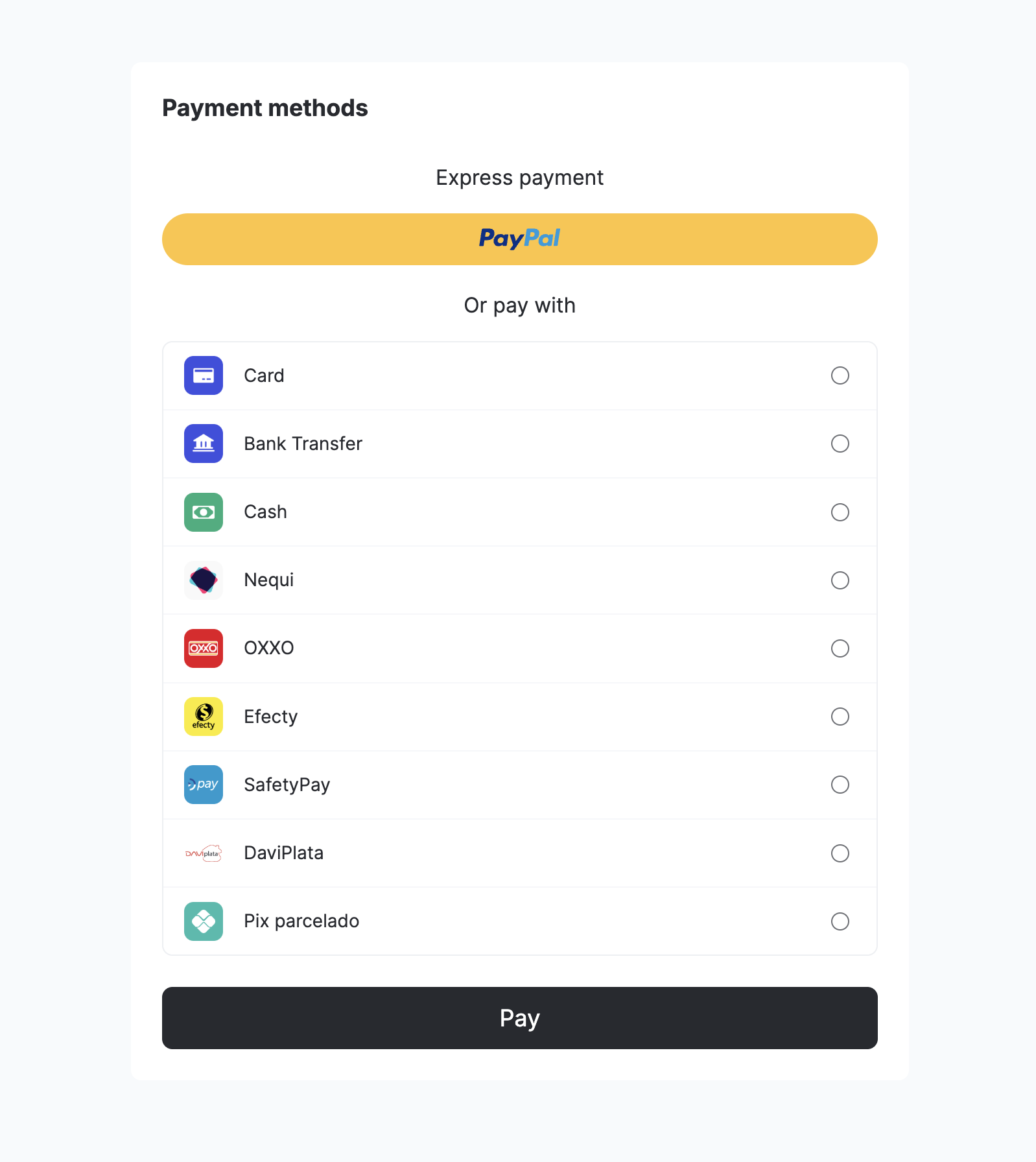
Yuno's **Seamless SDK** provides a simple and efficient integration while giving you full control over the payment experience. Like the [Lite SDK](/docs/sdks/overview/quickstart), it allows you to retrieve available payment methods and decide which to display during checkout. Once the selection is made, a single API and SDK call completes the payment process, creating an experience identical to the Lite SDK.
When using the Seamless SDK, you can:
* Execute the payment process.
* Enroll a credit card while making a payment by setting `vault_on_success: true` when creating the payment.
* Use a vaulted token from an enrolled payment method to complete a payment.
Use the following guides to implement each process.
 ## Payment workflow
The diagram below illustrates the complete payment workflow:
## Payment workflow
The diagram below illustrates the complete payment workflow:
 ### SDK Headless Payment Flow
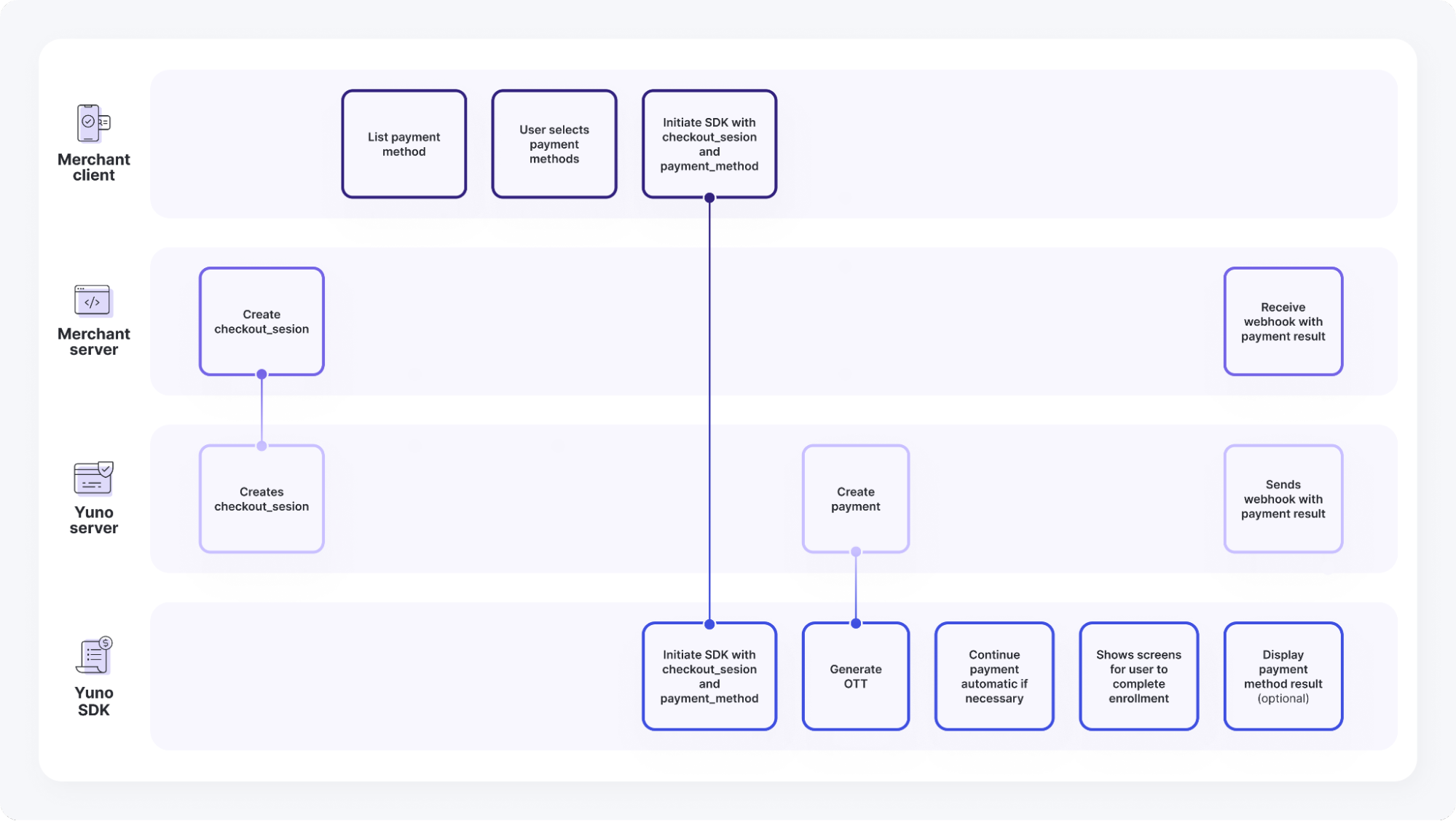
This diagram illustrates the headless payment process using the SDK, detailing the interactions between the Merchant Client, Merchant Server, Yuno Server, and Yuno SDK. It outlines the steps from initiating a checkout and requesting payment methods to creating and receiving the payment result.
#### Merchant Client
The Merchant Client represents your frontend application that interacts with both your backend server and the Yuno SDK. It handles the user-facing aspects of the payment flow, including:
* List payment method
* User selects payment methods
* Initiate SDK with checkout session and `payment_method`
#### Merchant Server
The Merchant Server represents your backend application that handles server-side operations and communicates with Yuno's servers. Its key responsibilities include:
* Create `checkout_session`
* Receive webhook with payment result
#### Yuno Server
The Yuno Server handles all backend operations related to customer management, checkout sessions, and payment processing. Its main responsibilities include:
* Creates `checkout_session`
* Create payment
* Sends webhook with payment result
#### Yuno SDK
The Yuno SDK handles the user interface and payment flow on the client side, managing payment method selection, token generation, and payment completion. Its key responsibilities include:
* Initiate SDK with `checkout_session and payment_method`
* Generate OTT
* Continue payment automatic if necessary
* Shows screens for user to complete enrollment
* Display payment method result (optional)
#### Flow
The following steps outline the complete interaction flow between all components of the SDK Headless Payment integration, detailing how each request and response moves through the system:
1. Merchant Server: Create `checkout_session` --> Yuno Server: Creates `checkout_session`
2. Merchant Client: Initiate SDK with checkout session and `payment_method` --> Yuno SDK: Initiate SDK with `checkout_session` and `payment_method`
3. Yuno Server: Create payment --> Yuno SDK: Generate OTT
## Platform-specific SDK setup
To implement the Full SDK integration, follow the platform-specific guides below:
Integrate Seamless SDK for Web applications.
Integrate Seamless SDK for iOS applications.
Integrate Seamless SDK for Android applications.
### SDK Headless Payment Flow
This diagram illustrates the headless payment process using the SDK, detailing the interactions between the Merchant Client, Merchant Server, Yuno Server, and Yuno SDK. It outlines the steps from initiating a checkout and requesting payment methods to creating and receiving the payment result.
#### Merchant Client
The Merchant Client represents your frontend application that interacts with both your backend server and the Yuno SDK. It handles the user-facing aspects of the payment flow, including:
* List payment method
* User selects payment methods
* Initiate SDK with checkout session and `payment_method`
#### Merchant Server
The Merchant Server represents your backend application that handles server-side operations and communicates with Yuno's servers. Its key responsibilities include:
* Create `checkout_session`
* Receive webhook with payment result
#### Yuno Server
The Yuno Server handles all backend operations related to customer management, checkout sessions, and payment processing. Its main responsibilities include:
* Creates `checkout_session`
* Create payment
* Sends webhook with payment result
#### Yuno SDK
The Yuno SDK handles the user interface and payment flow on the client side, managing payment method selection, token generation, and payment completion. Its key responsibilities include:
* Initiate SDK with `checkout_session and payment_method`
* Generate OTT
* Continue payment automatic if necessary
* Shows screens for user to complete enrollment
* Display payment method result (optional)
#### Flow
The following steps outline the complete interaction flow between all components of the SDK Headless Payment integration, detailing how each request and response moves through the system:
1. Merchant Server: Create `checkout_session` --> Yuno Server: Creates `checkout_session`
2. Merchant Client: Initiate SDK with checkout session and `payment_method` --> Yuno SDK: Initiate SDK with `checkout_session` and `payment_method`
3. Yuno Server: Create payment --> Yuno SDK: Generate OTT
## Platform-specific SDK setup
To implement the Full SDK integration, follow the platform-specific guides below:
Integrate Seamless SDK for Web applications.
Integrate Seamless SDK for iOS applications.
Integrate Seamless SDK for Android applications.